




IrriPro 4.7.2

New labels
New indication of the diameter and length of the pipes shown in the exported drawings (PDF and DXF). This will allow you to have more information during the installation phase.

Database
Database update for Pipelife, Azud and other brands
IrriPro 4.7.0

Closed networks
It is finally possible to design sector networks that present closed paths. This new typology concerns only the design but does not involve differences in the hydraulic calculation. Also available the new type of pipes to create closed rings or networks.

MAC version
After several reports of IrriPro incompatibility with new generation MAC systems we have, with this version, made deep changes that solve this issue.

No-watering area
New "No-watering area" function with which the user can indicate where the pipes should not pass. The system automatically considers the border of terrains as a "no-watering area" for main and secondary pipes.

Range modification
Generally the range is shown as nominal size and, after the hydraulic calculation, in according to the pressure. Now the user is able to modify the range value of the device up to 25% to take into account possible manual adjustments foreseen in the field in many models.

New report
The new report is now cumulative (of the whole network) of the hydraulic calculations with the data also of pressure losses, speed and lengths of the edges. Furthermore, the bill of materials can be exported by single sector or by the main pipeline only.

Updated console
A new version of the Google Maps console included in the software is released due to a technical incompatibility introduced by a Google update.
More info
 IrriPro versions prior to 4.7 will no longer be supported for the Google Maps service. In previous versions, the service will no longer be available starting from August 2022

Database
New Pipelife catalog and Netafim database update.
IrriPro 4.6.0

Emitter unit
With the new version it is possible to introduce, for each dripper and sprinkler, all the fittings and accessories that make up the emitting group.
Più info
The same structure can be saved and recalled at a later time for new systems. Everything connected to the emitter is then shown in the bill of materials in the right quantities.

TOOLTIP and reports
New tooltip that shows, for each element of the network, in addition to the various hydraulic and geometric quantities, the continuous (lateral) and localized (node) pressure drop, the height with respect to the ground, nominal and calculated range (sprinkler). New report with head loss, speed and cumulative length.

Import PDF
Improved the import of images (also in high resolution) in the workspace. It is finally possible to import also in PDF format.

Footer
New footer (with references of the designer, of the customer and indications of the project) exportable with the drawings

Database
Updated the catalog of Rivulis and Netafim.

German language
German language is now also available.
IrriPro 4.5.0

Pump
Possibility of identifying the pump or pumping station necessary for the system. Once the system has been defined, IrriPro allows to know all the data to identify the most suitable pump in a catalog.
More info
IrriPro is also able to consider:
- how a pump and a system work together with maximum precision
- verify that both are in the most efficient operating conditions or in any case within acceptable conditions
- possibility to evaluate an existing pump and what improvements would be made by replacing it with another one
- possibility to modify parts of the irrigation system and assess whether a pump continues to be adequate or needs to be replaced
A pump can be adequate for part of the plant but not for everything. With IrriPro we can know if and where a new pump must be inserted to supply the rest of the plant with sufficient pressure
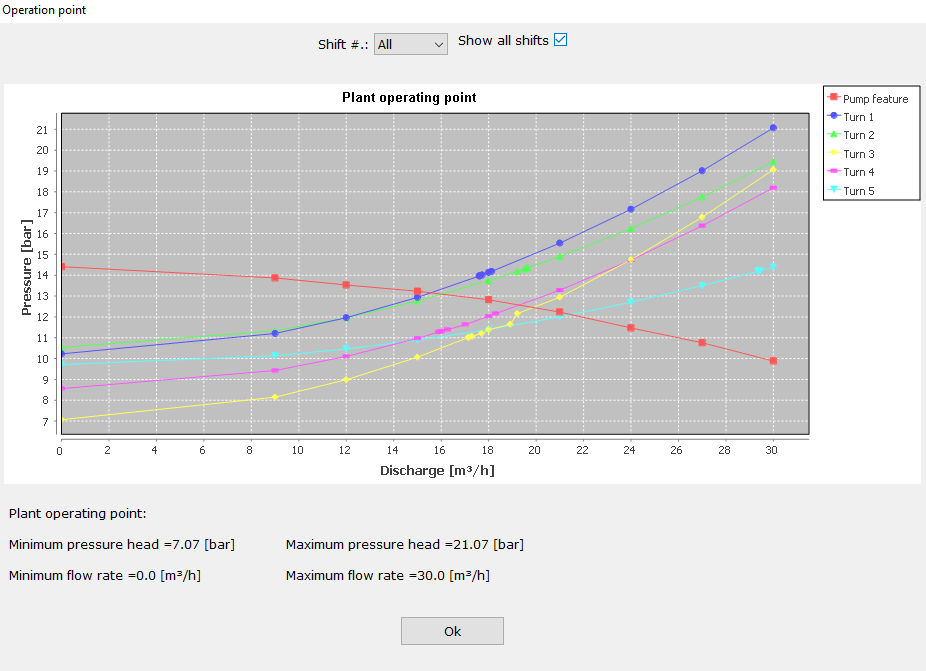
Duty chart
New graph representing how the irrigation system and the pump work together. Precise calculation of the duty point (pressure and flow rate values) given by the intersection of the plant curve (for single or all shifts) and the pump curve.
More info
Thanks to the new hydraulic calculation dedicated to the duty point, it is possible to check the quality of the choice of pump in operating conditions, simulating for example in sequence which shifts should be opened and which closed, analyzing the quality of irrigation at each shift.
Possibility for pump manufacturers to enter their catalog in the IrriPro database: the choice of the pump is one of the most frequent requests that our customers ask.

More layers
New layer management for multiple images and imported CAD files. Now in IrriPro you can move, rotate, scale and change the transparency of each single layer. Directly in the work area the user can overlay, move and scale more images and CAD drawings (both vector and raster files).
More info
For example, it is possible to use the overlap of satellite image, cadastral planimetry and CAD drawings for the design of the irrigation system. It is also possible to decide which layers to export (as a PDF or DXF file) by activating or deactivating the desired layer.
Alignment / filling
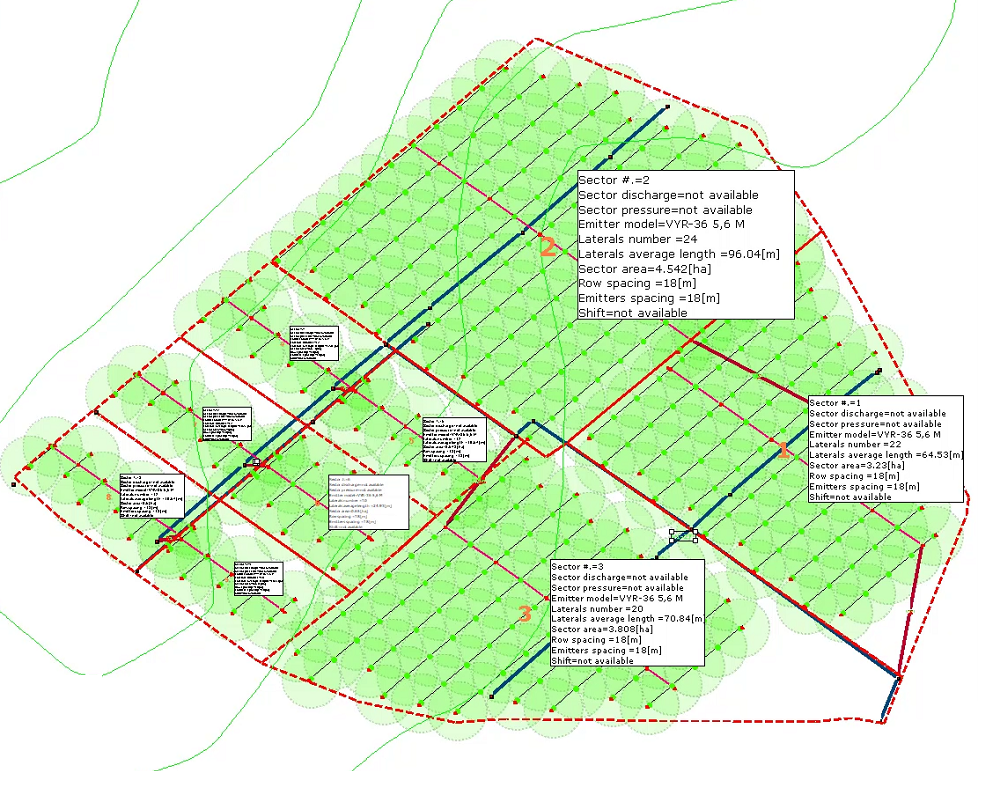
Updated the automatic network design (for sprinklers / pop-ups / mini-sprinklers) that allows to improve the alignment of the elements placed between neighboring sectors, to improve the coverage of the elements within each sector and avoid the overlap between the sprinklers.

Database
Updated the IrriPro database with the introduction of the new Irritrol and Weltplast brands, and the update by other manufacturers (Toro).

Language
Introduced the new Romanian language.
IrriPro 4.1.5

Pipes
New (automatic) pre-sizing of the main pipe after completing the wizard. Improved sizing by selection and by type of pipe (with preset speed values).

Selection
New cumulative selection: simply use the SHIFT key to add new elements to the existing selection and ESC (from menu or keyboard) to exit the selection
IrriPro 4.1.3
Sizing
New pipe sizing feature. In a dedicated window it is possible, according to the current hydraulic conditions calculated by the hydraulic simulation, to obtain automatically the values of the diameters for each category of pipes or for selected edge.
More info
Starting from the calculated values you can then choose the model and the brand of pipe by a query on the database. This feature is also able to make a telescopic pipe with the possibility of set up to 5 different diameters.

PAN con mouse
Cliccando sul tasto centrale del mouse è possibile utilizzare la funzione PAN senza la necessità di richiamare il comando dalle palette laterali.

Automatic insertion
The new Smart Wizard now allows to insert valves, filters and pressure adapters for all sectors and with a single selectable option. These elements can be placed in the secondary pipeline connected to the sector.

Rivulis catalog
Added about 6000 products from the Rivulis catalog. Currently IrriPro contains in its database more than 30,000 items including pipes, dispensers, sprinklers, pop-ups, fittings, valves, accessories, special parts and many other types of products of the most popular brands.

Vyrsa catalog
Thanks to the continuous collaboration with our partners we continuously update the IrriPro database. In this version the complete Vyrsa catalog was introduced.

Pre-sizing
Thanks to a sophisticated pre-sizing algorithm the software automatically determines the values of the diameters during the design of the network without any action by the user. This function happens just after the Smart Wizard.
More info
In silent way it will calculate and assign the diameters according to the nominal values of the emitters and to the geometrical, hydraulic and topographical conditions of the network and before any hydraulic calculation.
IrriPro 4.0.0

SMART Wizard
Thanks to the new Wizard called SMART, you can create multiple sectors in the same assignment operation (without declaring the number of sectors before drawing). This new feature saves a lot of time and avoids repeating the same operations for each sector.

Automatic maker
At the end of the Smart Wizard, the system performs the automatic drawing of all the required sectors, making a network including all the parts such as pipes, fittings and valves. The nodes of the main pipe are automatically connected to the sectors according to elevation and proximity criteria.

Symmetrical network
New option for the central connection of the symmetrical distribution. Possibility to supply the sectors centrally or at one end of the submain with a simple option selectable from Wizard.

Shift management
Management of shifts through a dedicated window. Possibility to manage each valve by putting it in a specific shift. Also available the function that automatically creates all the shifts by opening / closing one valve at a time.

Calculation of shifts
Now the hydraulic calculation can be performed for single shift or cumulatively ie for all shift sequentially so as to have an overall result. At the end of the calculation the complete thematic map is shown (showing the uniformity results of all the shifts in a single view).

Shift map
To better identify the different shifts is available the shift map with coloring of the sectors belonging to each shift.
IrriPro 3.9.11

Google Maps
Critical update for Google Maps console (previous versions will no longer be supported).
IrriPro 3.9.10

Kml / Kmz importation
Import of Kml and Kmz files with simultaneous import of the color graphics contained in the file, elaboration of the survey and the satellite image relative to the GIS position.

Contours lines
Choice of the equidistance value of the contour lines before the survey. In the international system it is possible to choose between the values of 1, 2, 5, 10 and 25 meters, while in the US and UK systems between 2, 5, 10, 25 and 50 feet.

Symbols
New vector symbols of the graphic elements (for a quality representation at any zoom) with the possibility to change the size from preferences.
More info
This allows you to manage the elements with the freedom to use large symbols in the case of large areas where a larger representation is needed, and smaller symbols in the case of small systems where they avoid overlapping in areas with greater concentration of elements.

CAD and improvements
Improvements for different functionalities: CAD file import, label management, area and rainfall intensity calculation, area division (for concave shapes), CAD file export (with new legend, symbols and layers).

Sectors legend
Work area with new legend (which can be moved to any position) and new information tables per sector where area, emitter model, number and length of lateral pipes, flow/pressure, emitter spacing, row spacing and shift are reported.

Zooming with mouse
New zooming function with the mouse: now you can easily move and zoom parts of the plant or part of the land simply by using the mouse wheel.

PDF exportation
New PDF export in vector quality where the elements and pipelines are represented in scale and in professional quality for a print in any dimension including legend, label, information table. Possibility to hide layers from the work area.

Database
Substantial database update with more than 6000 products added or modified, with data adjustments and image enhancement. Now you can view product images with a maximum resolution preview.
IrriPro 3.9.5

Big plant
The application has been optimized and the features improved to design greater systems faster and to cover more easily big areas. For example, once the area has been splitted into many parts, it's possible to assign / select (through the area of influence) the sector and to have automatically filled the angle value.

Valves and sectors label
Automatic label insertion for valves and sectors. An internal algorithm automatically displays the sector and valve number according to the general index of the elements and the insertion position. A valuable help for identifying the element and work on it.
More info
Added new layer for text and labels: it will be possible to hide or make the elements of the layer more transparent

Divide Area
"Divide Area" feature to divide an existing area into equal parts by defining one or two directions. Thanks to this new functionality, each area can be divided into sectors, to then build the system inside them. Now a new procedure allows you to quickly assign a part of area to the sector during the wizard.

Calculate sectors
"Calculates the number of sectors" feature to calculate, based on the available discharge of the source, on the surface, on the type and distribution of the emitters, etc.. the number of sectors in which to divide a surface. Other parameters (including needs of the crops) are used to extimate the number and duration of the shifts.

Model color
Different color assignment for each sprinkler model. It allows an immediate identification of the models and the places where they are used.

Perimeter sprinklers
Possibility to define the models of the perimeter sprinklers, even in the case of more adjacent sectors.
More info
Entering the sprinkler property, it is possible to indicate whether to extend to the perimeter of the sector or of the entire plant a different model from the others.

Text editor
A new text editor to insert text or modify the existing one, by color, orientation, font and size. It is also possible to intervene on the labels. Text and labels can be managed with a dedicated layer.

Pressured pipes
Color indication of pipes under pressure (water path) once the hydraulic calculation is performed: the pipes different from the gray color will be under pressure.

Coverage options
New preferences window to manage the following aspects: transparency sprinkler / popup coverage circles, enable / disable the continuity of sprinkler / popup circles on the borders of the terrains in adjacent sectors, to change the size of emitters and source.
CAD layers
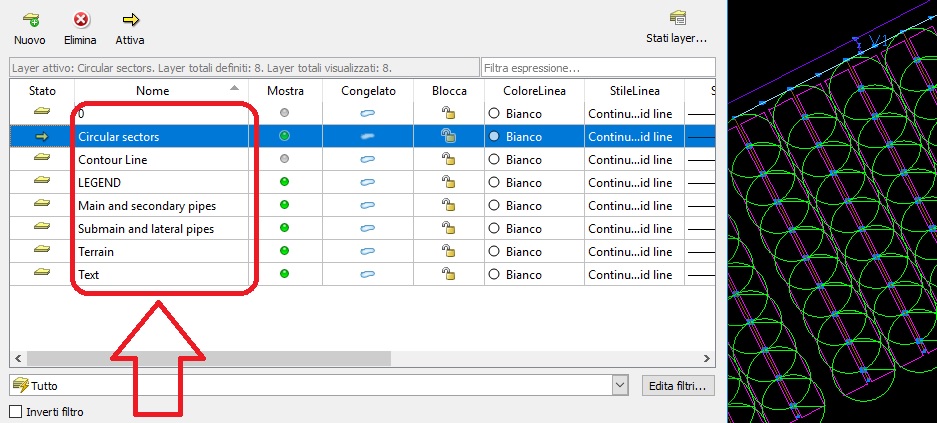
Importing of the CAD file with text and colors. The exported CAD file now has new layers for main + secondary pipelines, submains + laterals and one dedicated to sprinkler circles and text.
IrriPro 3.9.0

Survey with G Maps
Thanks to a new interpolation and elevation processing algorithm, Google Maps is now faster in processing, more accurate in creating the 3D model and producing improved image quality.
More info
Once the survey is performed, the contour lines will be displayed and, compared to the previous version, will cover the whole area and be placed with 2 meters interdistance.

Manufacturers catalogs
Version 3.9 includes the new Vyrsa, Toro, Palaplast, InstalPlast and Naandanjain catalogs.

Database
Finally, you can insert new items into the database. Through a window dedicated to each type of element, new joints, new dispensers, new pipes, etc. can be imported.
More info
In addition, new types of IrriPro database elements have been introduced (pumps, accessories and control units). You can manage and delete items that you just entered.

Grafico 3D
Improved and faster representation of the 3D graphic of hydraulic quantities. The window will open faster (processing optimized for large installations) and a color gradient image will be displayed.
IrriPro 3.8.5

Performance
Deep optimization of the design process and hydraulic calculation which now allow you to draw and design big networks (also over 5 million of emitters). The improvements on the calculation performances make faster the achieve the result.

Direct print
The new print feature allows you to print directly from the work area. You can print the entire contents or selected layer.

Pipe way
All types of pipes that possess a relative direction(that is the direction of water flow along the pipe), can be reconnected even in the opposite direction. The software will automatically change the direction making it compatible with the new connection.

Symmetric arrangement
New option now allows, in the case of symmetrical patterns, to indicate the direction of the laterals, the position and direction of the submain. It will then be possible to define the point from which the submain must pass and the relative direction.

Thematic map
A new coloration of thematic map distinguishes the areas with too high pressure/flow rate, compared to other with too low pressure/flow rate. New colors indicate areas with high uniformity respect to areas with acceptable uniformity and those where uniformity is not acceptable.

Updated database
From the 3.8.5 version are available, in IrriPro database, the new catalogs of Hunter, Rainbird and K-Rain. Please note that the freeware version has a very limited database, and these catalogs are present only in versions under license.

Languages
Through a dedicated console now you can change the language in one of those available, as well as allow the software to choose it automatically, basing on the operating system language. Also improved the translation of Spanish and Russian, and introduced the Ukrainian language.
IrriPro 3.8.0

Rain and gardening
Improved the inclusion of sprinklers and popups for a more advanced and easy management of sprinklers and gardening. Now you can place the units in sequence being able to appreciate the wet circle and the coverage angle before securing the position.

Range
For the sprinklers, popups and spries, the program will show the range and calculate the correct coverage angle according to the position of the appliance with respect to the border of the terrain. The range (for static pop-ups) will be a function of the coverage angle.

You can also manually change, for single or groups of devices, the range, the coverage angle and the angle offset. Once you choose from database the item to be used, the software will take into account, for the hydraulic calculation and rainfall coverage, if the unit is with fixed or variable angle, whether static or dynamic.

Coverage angle
IrriPro, in addition to changing the angle of the coverage based on the boundaries of the terrain, allows, in the case of neighboring or near edges, to maintain the continuity of coverage. As the picture shows, circles of the sprinklers of the two adjacent sectors are drawn with a full angle of 360 ° unlike the others, in the rest of sector, which are limited to the lower corners.

Rain map
The new rainfall map indicates with increasingly dark colors the areas with greater intensity of rain compared to those with less intensity. Also this representation will show the range calculated in function of the pressure.

Pressure and range
The sprinkler range is a function of pressure. In thematic map, in addition to the color, it will be shown the coverage (or the circular sector) actually reached by the device. In the picture the comparison between two area of the plant subjected to different pressures. In this way, it will be evident also the overlap area wet and intensity of rainfall.

Z elevation
You can now specify the elevation of each network element. Now the user can specify the depth of the pipeline relative to the surface of the land or the height of the sprinkler. For example in an open field system with sprinkler irrigation the height of the columns of the sprinklers. Z value will be taken into account in the hydraulic calculation.

Triangular arrangement
You can now choose the new triangular arrangement (QUINCUNX) in place of the rectangular. In addition to defining the number of laterals per crop row (eg. double lateral, triple lateral, etc.) the arrangement can be triangular starting from the even side or from the odd side.

CAD importation
Improved CAD file import process. Now many more elements of the DXF file will be imported to a dedicated layer of IrriPro, including text, circles, polylines, and many other things. This procedure also allows you to create 3D terrain model taking into account the elevation points and the contour lines included in the imported DXF file.

Diameter legend
A new legend of colors now allows to distinguish the diameter of the pipelines from the value of 16 mm (3/8 ") to that of 710 mm (28"). The colors and ranges of the diameters can be modified by the user.
Sizing
New pipe sizing feature. In a dedicated window it is possible, according to the current hydraulic conditions calculated by the hydraulic simulation, to obtain automatically the values of the diameters for each category of pipes or for selected edge.
More info
Starting from the calculated values you can then choose the model and the brand of pipe by a query on the database. This feature is also able to make a telescopic pipe with the possibility of set up to 5 different diameters.
PAN con mouse
Cliccando sul tasto centrale del mouse è possibile utilizzare la funzione PAN senza la necessità di richiamare il comando dalle palette laterali.
Automatic insertion
The new Smart Wizard now allows to insert valves, filters and pressure adapters for all sectors and with a single selectable option. These elements can be placed in the secondary pipeline connected to the sector.
Rivulis catalog
Added about 6000 products from the Rivulis catalog. Currently IrriPro contains in its database more than 30,000 items including pipes, dispensers, sprinklers, pop-ups, fittings, valves, accessories, special parts and many other types of products of the most popular brands.
Vyrsa catalog
Thanks to the continuous collaboration with our partners we continuously update the IrriPro database. In this version the complete Vyrsa catalog was introduced.
Pre-sizing
Thanks to a sophisticated pre-sizing algorithm the software automatically determines the values of the diameters during the design of the network without any action by the user. This function happens just after the Smart Wizard.
More info
In silent way it will calculate and assign the diameters according to the nominal values of the emitters and to the geometrical, hydraulic and topographical conditions of the network and before any hydraulic calculation.