



Product
activation
To activate the IrriPro software
This procedure refers to IrriPro already installed in the FREEWARE version and having the serial code available:
1.
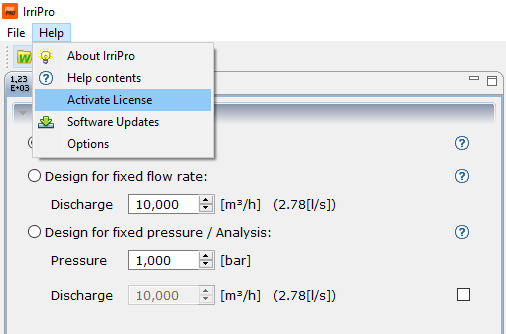
Click on Help item at the top left menu and then in the drop down menu click on Activate License


2.
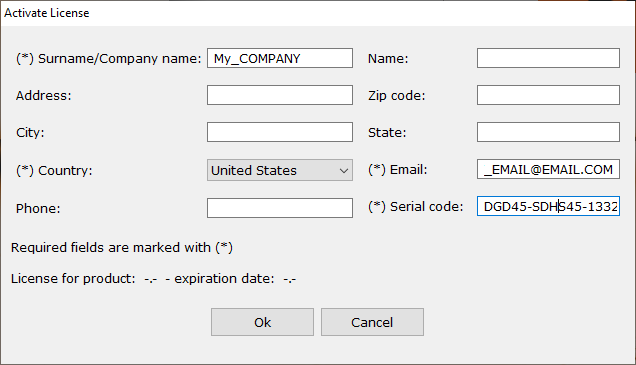
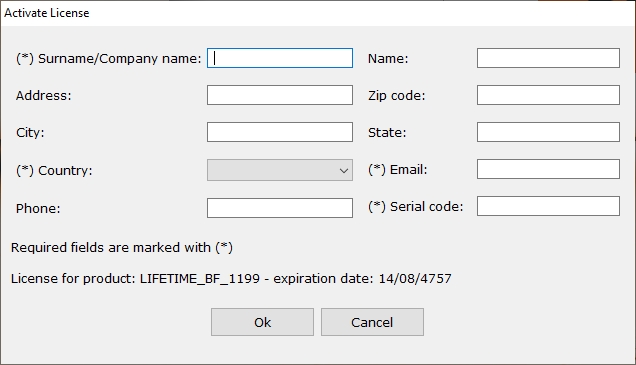
Inside the window fill out all required data marked with (*). Copy here the serial code received by mail, and then click on OK
WARNING: Copy the serial number without special character or typing spaces, especially before and after the text. Check data in the required fields for accurency because once actived the product, it won’t possible to modify anymore. The inserted name will be recognized as true owner of license and his name will be put on papers made by the software.
3.
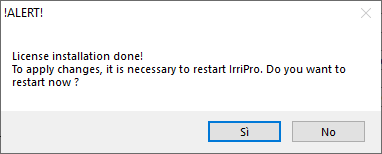
If the procedure is successful will appear, after a few seconds, the confirmation activation window asking to restart the application

4.
Returning to the same window, after restarting IrriPro, it will show the activated type of license and the expected expiration date
A single license can be installed up to 3 PCS but you can’t use it on two PCS in the same time. In other words you could install and activate IrriPro on a desktop at home, in office and on a laptop (at most 3 PCs) but it is not possible to use IrriPro simultaneously in the home PC and in the office PC. If the activation is repeated more than 3 times with the same license it will be blocked and it will be necessary to request assistance for unlocking.